
Schneider-Electric PowerTag Energy Sensors

Supported Devices
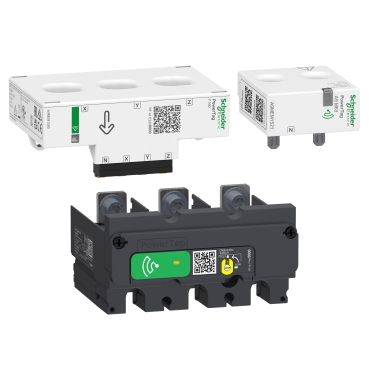
The PowerTag Energy sensors are wireless energy sensors designed to be mounted directly on circuit breakers. They communicate wirelessly to a concentrator/gateway, which in turn communicates via Modbus TCP.
| Device Type | Modbus TCP (Ethernet) | RS485 |
|---|---|---|
| Schneider-Electric PowerTag Energy (R9M Series) | ✅ | ❌ |
Note
Gateway Required: The PowerTag sensors are wireless devices. To communicate with the Controller, they must be paired with a compatible Modbus TCP gateway (e.g., Acti9 Smartlink SI D, Wiser Gateway, or PowerTag Link).
Wiring
Voltage Connection
The PowerTag is mounted directly onto the circuit breaker. The voltage measurement cables must be connected to the terminals of the breaker or the load.
- Mounting: Clip the PowerTag to the top or bottom of the circuit breaker (depending on the model and space available).
- Voltage Taps: Connect the voltage measurement wires (Phase and Neutral) to the appropriate terminals on the breaker.
Communication Wiring (Ethernet)
For correct ethernet wiring of the Gateway: Follow the guidelines for ethernet wiring.
Configuration
Gateway Configuration
- Pairing: The PowerTag must be paired with the Gateway using the specific commissioning software or App provided by Schneider Electric (e.g., EcoStruxure Power Commission or Wiser App).
- Network: Assign a static IP address to the Gateway to ensure stable communication with the Controller.
- IP Address: Enter the IP address of the Gateway.
- Slave Address (Unit ID): This corresponds to the specific address assigned to the PowerTag within the Gateway. Check your Gateway's configuration to determine the Modbus Slave ID (Address) for the specific PowerTag you wish to read.
Note
The driver scans for devices based on the Modbus Address. Ensure the "maxBusAddress" parameter covers the range of addresses assigned to your PowerTags in the gateway.