
Acuvim IIR-Energiezähler

Unterstützte Geräte
| Device Type | Modbus TCP (Ethernet) | RS485 |
|---|---|---|
| Acuvim IIR Energy Meter | ✅ | ✅ |
| Acuvim 3 Energy Meter |
Verbindung
Ethernet
Für eine korrekte Ethernet-Verkabelung: Befolgen Sie die Richtlinien für die Ethernet-Verkabelung.
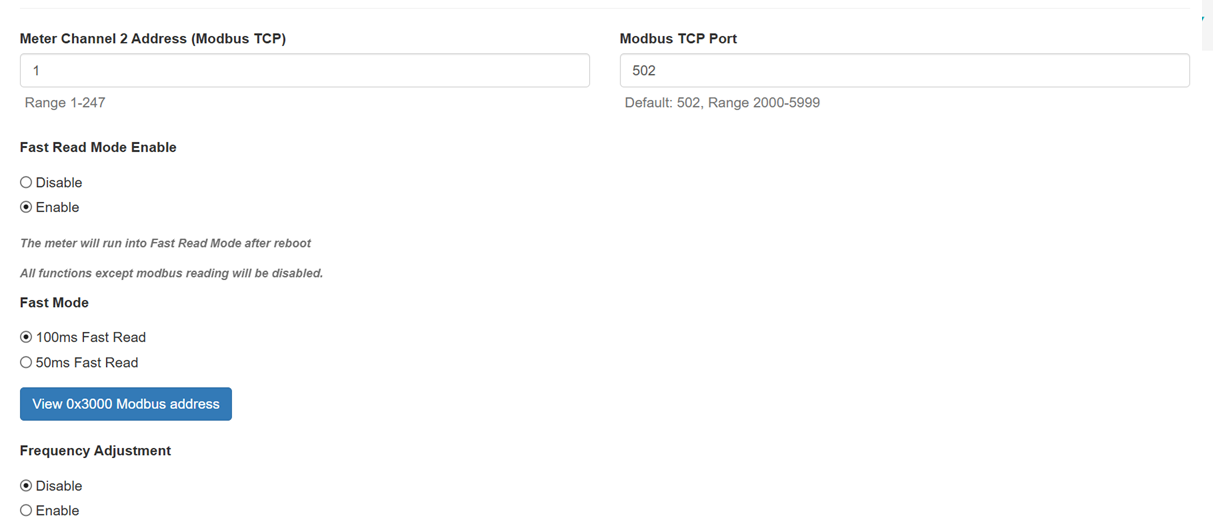
Wenn Sie einen Accuenergy-Energiezähler haben, sollten Sie über eine Schnittstelle verfügen, um ihn zu verwalten. Gehen Sie in dieser Schnittstelle zur Seite Settings und wählen Sie dann das Menü Communications aus.

Scrollen Sie anschließend, bis Sie diese Felder finden:
Warnung
Warnung
Stellen Sie sicher, dass der Port auf 502 eingestellt ist, der Fast Read Mode aktiviert ist und auf 100ms Fast Read eingestellt ist.
RS485
Info
RS485 Wiring
- For correct RS485 wiring: Follow the guidelines for RS485 wiring.
- If the wiring shown in the table below is incorrect, please let us know.
- There is no general consensus in the industry about the usage of A and B for the RS485 polarity, so it may be counterintuitive and opposite of what you might expect for some devices.
| Device | SmartgridOne Controller model OM1 | SmartgridOne Controller model IG8 | RS485-USB converter | RS485-Ethernet converter |
|---|---|---|---|---|
| RS485 A | RS485_POS | RS485 A | TX+ | |
| RS485 B | RS485_NEG | RS485 B | TX- | |
| RS GND | GND | Not available | G |
Warnung
NOTE: RS485 Device Addresses
- You MUST give each device on the RS485 bus a unique address. Check the manual of the device on how to do this.
- Use lower addresses first (1, 2, ...) because the SmartgridOne Controller will find them faster!
- For each device, it is generally recommended to stick with the factory default baud rate, parity, and stop bits. The SmartgridOne Controller will scan on those first.
Last updated December 11, 2025Edit this page