Setting the local control modes
Setting the control modes
Note
The default control modes are requested during the initial setup. You can change them later under the "Settings" menu, in the section "Default working mode of the SmartgridOne Controller".
Warning
External signals and special local control modes If external control signals (Yuso, Edmij, Frank Energie, ...) or special local control modes are active, they have priority, and the default control modes below are only used as fallback for the devices they do not cover, or when the signal is not active.
Tip
Full explanation Below is a brief description of the available control modes. For more information, see Full explanation of the local control modes.
Under "Default working mode" choose for each type of device which control mode you want to use. Depending on the chosen mode, extra options appear below the dropdown. Scroll down and click "Save" to store the settings.
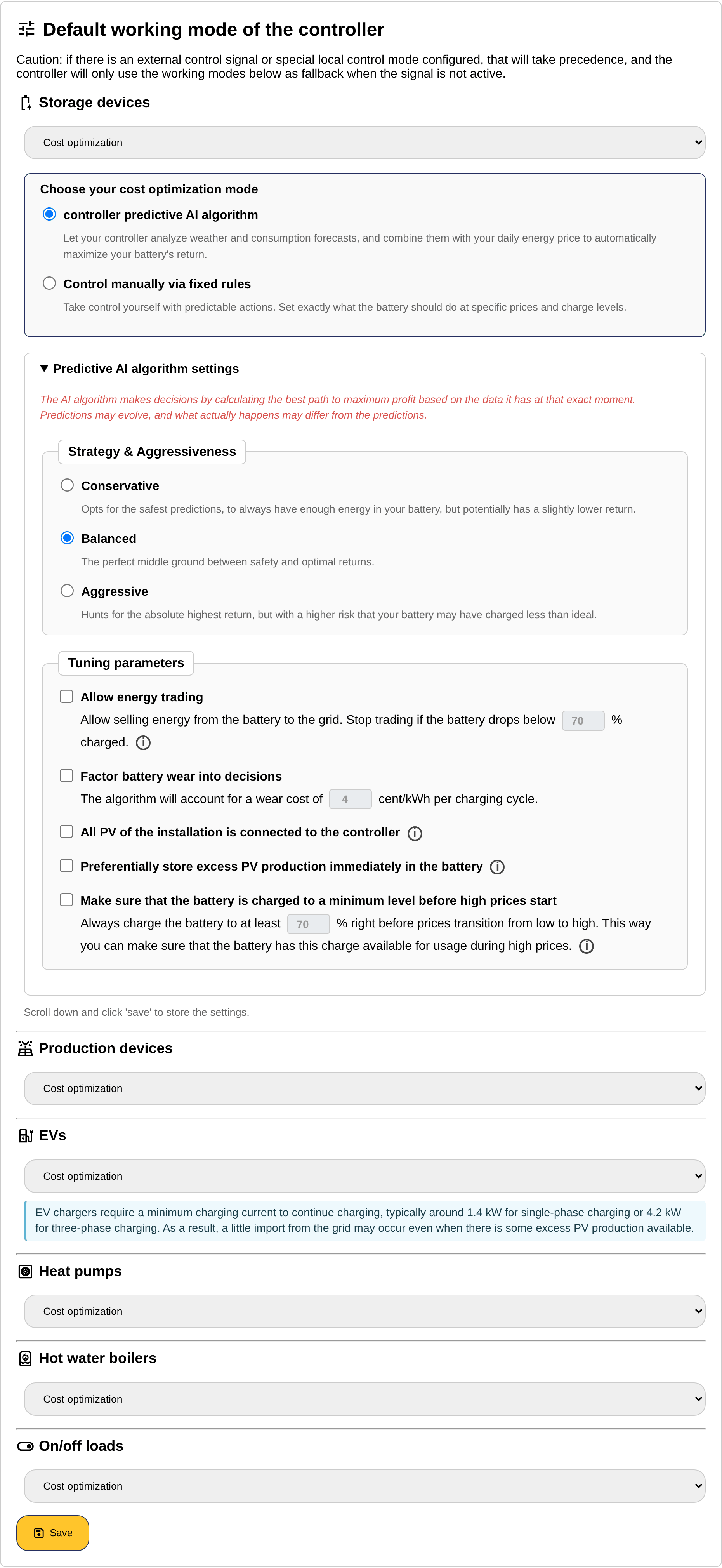
STORAGE DEVICES (BATTERY SYSTEMS)
- Don't control: No active control. (Note that this can be overwritten by an external signal.)
- Self-consumption optimization: Charging when there is excess solar power, and discharging when energy is taken from the grid.
- Cost optimization: Charge with the least expensive energy, and cover consumption at the most expensive times. A box "Choose your cost optimization mode" appears, with the choice between the SmartgridOne Controller predictive AI algorithm (with its strategy, energy trading, wear cost and other tuning parameters), manual control via fixed rules, and recharging at low cost for peak shaving. See Battery cost optimization settings.
- Peak shaving: Discharge at times of peak consumption from the grid, and charge at off-peak times. The four peak shaving thresholds appear below the dropdown, see Battery peak shaving. Optionally, a secondary control mode uses only a partition of the battery for peak shaving and controls the rest for cost or self-consumption, see Peak shaving plus.
- Control exclusively through external API: Only charge and discharge according to external control signals.
PRODUCTION DEVICES
- Don't control: No active control. (Note that this can be overwritten by an external signal.)
- Cost optimization: PV production is turned off at negative purchase prices (you are then paid to consume), and limited to your energy consumption at negative sales prices (you pay to inject your surplus). At other times, PV production is limited to the allowed grid export power.
- Feed in restriction till allowed grid export power: Limit PV production to the allowed grid export power.
- Control exclusively through external API: Only limit PV production according to external control signals.
EVs (ELECTRIC VEHICLES)
Note
Minimum charging current EV chargers require a minimum charging current to continue charging, typically around 1.4 kW for single-phase charging or 4.2 kW for three-phase charging. So charging is possibly not reduced to zero when ideally it should be, and a little import from the grid may occur even when there is some excess PV production. See also the setting "Allow suspending charging" in the device settings.
- Don't control: No active control. (Note that this can be overwritten by an external signal.)
- Self-consumption optimization: Charging when there is excess solar power. A submode appears: "Only schedule at moments of excess production, but allow minimal import from the grid if that excess production is insufficient", or "Only schedule when there is sufficient excess production".
- Cost optimization: Charge with the least expensive energy.
- Load balancing: Limit charging to the maximum allowed grid import power, and distribute the power over the chargers.
HEAT PUMPS, HOT WATER BOILERS AND ON/OFF LOADS
The three device types each have their own dropdown with the same options, so that for example the boilers can follow another mode than the heat pumps.
- Don't control: No active control. (Note that this can be overwritten by an external signal.)
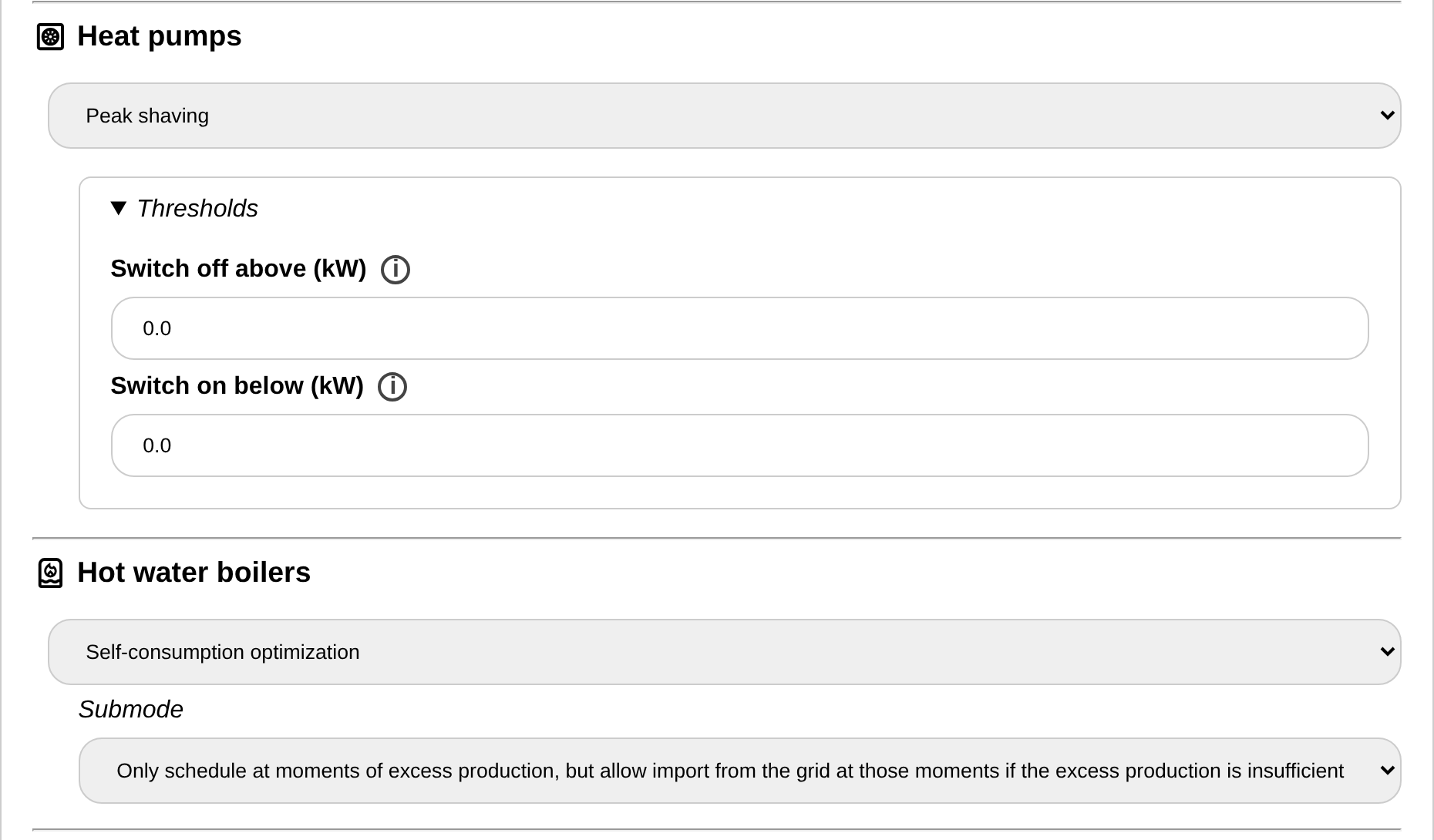
- Self-consumption optimization: Prefer consumption when there is surplus solar energy. A submode appears:
- Only schedule at moments of excess production, but allow import from the grid at those moments if the excess production is insufficient.
- Only schedule when there is sufficient excess production.
- Prefer moments of excess production, but also allow to schedule at moments of low import.
- Cost optimization: Prefer consumption with the least expensive energy.
- Peak shaving: Switch the devices off when the grid power exceeds a threshold, and on when it drops below another threshold. The two thresholds appear below the dropdown: "Switch off above (kW)" and "Switch on below (kW)". By default they are 75% of the allowed grid import power and 75% of the allowed grid export power respectively (positive is import, negative is export).
- Always powered on: Always on, unless overridden by an external control signal.
- Always powered off: Always off, unless overridden by an external control signal.
Note
The settings page checks the values you enter: a threshold that is not between the other thresholds or outside the grid limits is flagged below the field, and cannot be saved until it is corrected.