

Wallbox EV Charging Stations
Supported Devices
| Device Type | Variants | Cloud API | Modbus TCP (Ethernet) | RS485 |
|---|---|---|---|---|
| Pulsar | Plus/Max/Pro | ✅ | ❌ | ❌ |
| eM4 | All | |||
| Quasar 2 | ||||
| Commander | ||||
| Copper SB | ||||
| Supernova | ❌ | ✅ |
Connection
The communication between the SmartgridOne Controller and the Wallbox EV Charging Stations is established through API and Modbus TCP. No physical cables are required to the SmartgridOne Controller.
Settings
Pulsar | eM4 | Quasar 2
No additional settings have to be made on the Wallbox side.
Supernova
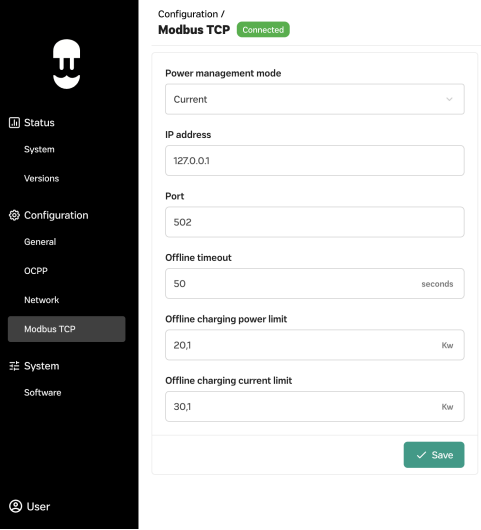
- Open the WebManager of the Supernova
- Go to "Configuration" > "Modbus TCP"
- Set the "Power Management Mode" to "Current"
- Set a static IP address for the Supernova
- Set the "Port" to "502"
- Save the settings
Last updated December 10, 2025Edit this page