SmartgridOne logo
SmartgridOne logo
Accessori
AppAvvertenze di sicurezza, manutenzione e legaliAvvio rapido
Cassetta degli attrezzi
Certificati
Configurazione dalla A alla Z
Controllore
Dispositivi
Caldaia
Carichi commutati
Cloud
Contatore del gas
Contatore dell'acqua
Contatore di Energia
Inverter Ibridi Fotovoltaici e per Batterie
a-TroniXABB, FIMERADS-TecAlphaESSAmpowrAngileApparecchiature EPAPsystems
Autarco
Batteria AtepsBeauventC-BatteryCellpowerChisageDanfossDeltaDEYEDiehl-AkoDynessDysun EnergyEcosourcenEenovanceElecnovaEnbrilionEnergreenEnerlutionEnjoyPowersEnphaseEVEFortona
Foxess
FraxFroniusGoodWeGotionGreener / Alfen
Growatt
HiteHithium
Huawei
Hypontech
Hyxipower
Inverter DMEGCInverter ESYInverter Fotovoltaici, Ibridi e a Batteria DET PowerInverter Fotovoltaici, Ibridi e per Batterie AnklousiWellJinkoKacoKehuaKostal
Kstar
MarstekMastervoltMidTeQMotomaOctave EnergyOmniPowerPixiiPower-SonicPoweroadPrimaPylontechRefurbRegitecRenonRitarSAJSchneider SunEzySchucoSCUSE2200H fino a SE6000HSessySigenergySinexcel
Sma
Socomec
Sofar
Solaredge
SolarlogSolarMaxSolarwattSolaxSolinteg
Solis
Inverter Ibridi Solis
3t10K-HVES-G5 CablaggioS-Series-Ibrido
Inverter Solis connessi alla rete
Solplanet
Sungrow
SunwaytechSunwoda
Sunwoda
Sus-PowerTeclomanTeploreTesvoltVaconVictronVolstoraWattsNextWeihengXantrexZendure SolarFlowZeversolar
Nuove integrazioni
Plc
Pompa di calore
Stazione di Ricarica EV
InstallazioneLED di statoLicenzaLinee guida per cablaggio e connettivitàRete
Risoluzione dei problemi
Segnali Esterni
Specifiche
Specifico del Cliente
Tempo di risposta del controlloVideo tutorial
DispositiviInverter Ibridi Fotovoltaici e per BatterieSolisInverter Ibridi Solis
logo

Questa pagina descrive la comunicazione con un Solis 3T10K tramite Modbus-RTU (rs485). Di default, l'inverter è impostato all'indirizzo 1. Questo può essere modificato tramite il display dell'inverter. Puoi trovare la procedura nel capitolo 7.3.2 del manuale. I terminali RS485 si trovano nella parte inferiore dell'inverter dietro una piastra di protezione.

Info
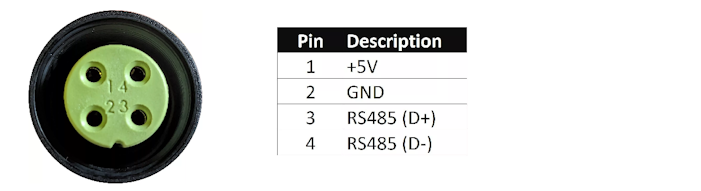
RS485 Wiring
  • For correct RS485 wiring: Follow the guidelines for RS485 wiring.
  • If the wiring shown in the table below is incorrect, please let us know.
  • There is no general consensus in the industry about the usage of A and B for the RS485 polarity, so it may be counterintuitive and opposite of what you might expect for some devices.
DeviceSmartgridOne Controller model OM1SmartgridOne Controller model IG8RS485-USB converterRS485-Ethernet converter
Pin 3RS485 ARS485_POSRS485 ATX+
Pin 4RS485 BRS485_NEGRS485 BTX-
N/ARS GNDGNDNot availableG
Image
Avviso
NOTE: RS485 Device Addresses
  • You MUST give each device on the RS485 bus a unique address. Check the manual of the device on how to do this.
  • Use lower addresses first (1, 2, ...) because the SmartgridOne Controller will find them faster!
  • For each device, it is generally recommended to stick with the factory default baud rate, parity, and stop bits. The SmartgridOne Controller will scan on those first.

Inverter Ibridi Solis

Previous Page

S-Series-Ibrido

Next Page