
عدادات الطاقة Schneider-Electric من سلسلة PM 5000

الأجهزة المدعومة
تغطي سلسلة PM 5000 نطاقًا واسعًا من العدادات. تختلف الإمكانات حسب رقم الطراز المحدد (مثلًا، تكون طرازات PM51xx عمومًا مزودة بـ RS485 فقط، بينما تتضمن طرازات PM5320/PM5340 اتصال Ethernet).
| Device Type | Modbus TCP (Ethernet) | RS485 |
|---|---|---|
| Schneider-Electric PM 5100 / 5110 / 5111 | ❌ | ✅ |
| Schneider-Electric PM 5310 / 5330 / 5331 | ||
| Schneider-Electric PM 5320 / 5340 / 5341 | ✅ |
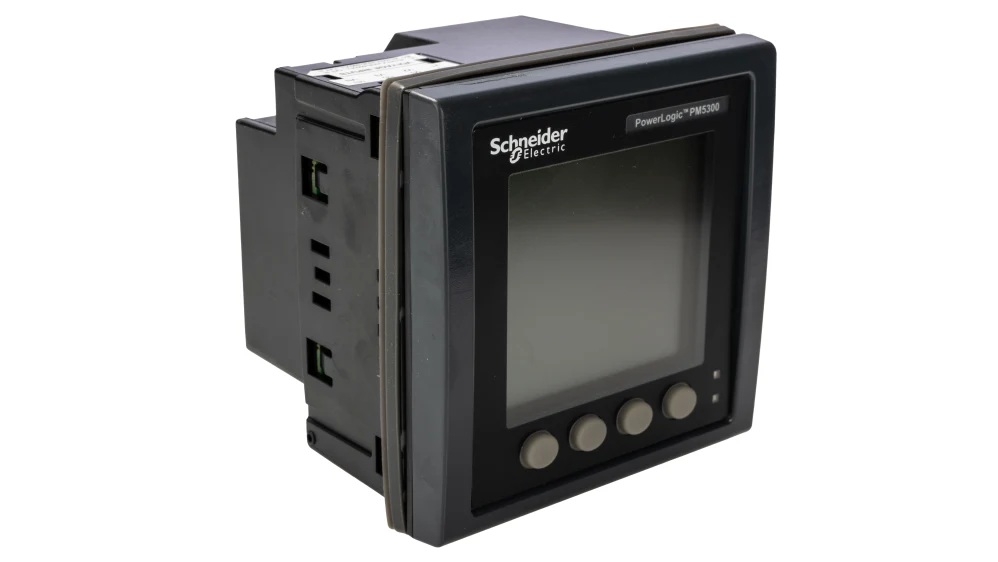
pm5300
التوصيل
Ethernet
ينطبق فقط على PM5320 وPM5340 وPM5341. للتوصيل الصحيح لشبكة Ethernet: اتبع إرشادات توصيل Ethernet.
RS485
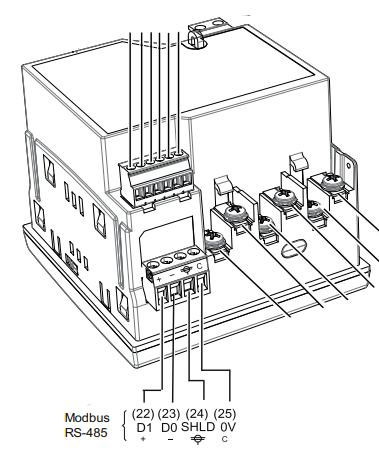
توجد أطراف RS485 في الجزء السفلي من الجهاز (الموصل 6 في المخطط أدناه).
معلومات
RS485 Wiring
- For correct RS485 wiring: Follow the guidelines for RS485 wiring.
- If the wiring shown in the table below is incorrect, please let us know.
- There is no general consensus in the industry about the usage of A and B for the RS485 polarity, so it may be counterintuitive and opposite of what you might expect for some devices.
| Device | SmartgridOne Controller model OM1 | SmartgridOne Controller model IG8 | RS485-USB converter | RS485-Ethernet converter |
|---|---|---|---|---|
| Terminal 22 / D1 (+) | RS485 A | RS485_POS | RS485 A | TX+ |
| Terminal 23 / D0 (-) | RS485 B | RS485_NEG | RS485 B | TX- |
| Terminal 25 / 0V | RS GND | GND | Not available | G |
ملاحظة
ملاحظة
التدريع: يجب توصيل سلك التدريع بـ الطرف 24 (SHLD). لاحظ أن طرف التأريض غير متاح في العداد نفسه؛ يجب توصيل التدريع بالأرضي عند الطرف الآخر من الناقل[cite: 246, 1627].
التكوين
Ethernet
ينطبق فقط على PM5320 وPM5340 وPM5341. لتكوين عنوان IP:
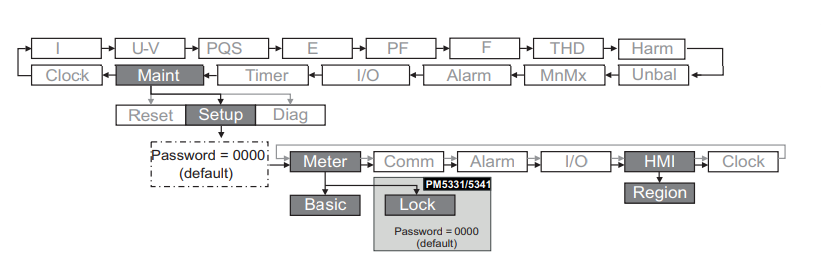
- انتقل إلى Maint > Setup > Comm > Enet.
- قم بتكوين عنوان IP وقناع الشبكة الفرعية والبوابة.
- تأكد من تمكين بروتوكول Modbus TCP (عادةً المنفذ 502).
RS485
تحذير
NOTE: RS485 Device Addresses
- You MUST give each device on the RS485 bus a unique address. Check the manual of the device on how to do this.
- Use lower addresses first (1, 2, ...) because the SmartgridOne Controller will find them faster!
- For each device, it is generally recommended to stick with the factory default baud rate, parity, and stop bits. The SmartgridOne Controller will scan on those first.
لتكوين الإعدادات التسلسلية (معدل Baud والتكافؤ والمعرّف):
- انتقل إلى Maint > Setup > Comm > Ser.
- حرّر العنوان (معرّف الوحدة) ومعدل Baud والتكافؤ لتتطابق مع إعدادات البوابة.
Last updated December 11, 2025Edit this page