
Advanced/dynamic contract
The advanced dynamic energy contract configurator is available for any location and currency. This configurator requires you to specify a default rule and a list of extra rules, where each extra rule has an associated timing. This allows for the configuration of energy contracts where prices are time-dependent (e.g., dual tariffs).
Figure: Configuration of Engie Flow variable (BE) contract as of April 2026, for a dual-tariff digital meter located in the Fluvius Imewo network. Note that the off-peak tariff is the default rule and peak tariff the additional rule. The peak rate will be applied on weekdays between 7 am and 10 pm, meaning that the off-peak tariff will be active during weekends and night time hours. Download the PDF
Rule configuration
Each rule specifies at least either a consumption or an injection price formula and (for non-default rules) a timing. In accordance with this, the rule configuration page has three sections:
- General: Specify the name, scope (consumption/injection), and timing.
- Data sources: Import data (like market prices) for use in formulas. E.g. adding a specific day-ahead market as a data source, enables a “day-ahead price” variable which may then be used in the formulas.
- Formula: Compose injection/consumption formulas via a drag-and-drop interface.
General
The general section asks to specify the following inputs for non-default rules:
- Name: A non-functional name used for organizational purposes. (The default rule has no name.)
- Applies to: Define whether the rule specifies a consumption (off-take) price, an injection price, or both. (The default rule requires to specify both a consumption and an injection price.)
- Timing: When the rule should be applied. Options include:
- Always
- On specific weekdays, the entire day: Specify active weekdays.
- During a time range, repeated on specific weekdays: Specify a start/end time and days. If the start time is later than the end time (e.g., 10 PM to 6 AM), the UI will automatically update to reflect the overnight span. Note that the times should always be expressed in local time in the timezone the controller is located.
Figure: Typical settings of a peak rate rule. Peak hours depend on the specific location but in Belgium 7 a.m. to 10 p.m. is the most common.
Data sources
Adding data sources enables extra variables which can then be used in the consumption or injection formula. Click on the “+ Add” button to add a new data source and click on a pill to view the details of the corresponding data source. Pills in black are correctly configured, pills in red indicate a data source which requires extra input. Data sources can be removed by selecting them and using the delete button in their detail view.
Figure: Example configuration of a day-ahead market price. The price data source is highlighted and in red, meaning it can be edited, but its configuration is not yet completed. The Netherlands are selected, but a choice between quarter hourly and hourly prices remains to be made. As of Oct. 2025, quarter hourly prices are commonly used.
Even though a single data source is sufficient for specifying the formulas, it is possible to configure multiple sources for less common setups. In case multiple data sources are configured, they are numbered and each variable receives a number corresponding to its data source.
Supported Sources (more may be added in the future):
- Day-ahead market: depending on the selected currency, a list of countries is shown. After selecting a country, a specific market must be chosen. Many countries have both hourly and quarter hourly prices and some (e.g. the Nordics) have regional prices. A paid "long-term market prediction" feature may be available, depending on the EMS installers and market. When configured, this allows the controller to take prices up to several days in the future into account. Adding a day ahead market adds a “day-ahead price” variable in the formula builder.
- Tibber API: Tibber is an energy provider which offers their customers to collect their consumption/injection prices via an API. To add a Tibber datasource, an API key must be provided, which will be used by the controller to fetch this data. Adding a Tibber data source adds a “consumption price” and “injection price” variable in the formula builder.
Formula
The formula section allows configuring the consumption (offtake) and/or injection energy price formulas via a drag-and-drop interface. New blocks are added to a formula by dragging them from the Available blocks area to a formula area and they are removed by dragging them from a formula area to the Drop to delete area. A red border will show around a formula when it is currently invalid. All formulas must be valid before a rule can be saved.
For each formula, the unit may be configured (e.g. currency/kWh, currency/MWh). Which units are available depends on the selected currency. Because this type of configurator is generic, it directly applies the entered prices, so it is important to explicitly include VAT, transport costs, duties or any extra cost in the entered numbers.
Figure: Example configuration of an Energie.be dynamic contract ( Download the PDF ) for consumption and an Engie Empower ( Download the PDF ) contract for injection as of April 2026, for a dual-tariff digital meter located in the Fluvius Imewo network.
Rule overview
The energy contract overview shows an overview of all configured rules and their corresponding timings and formulas. The controller will always calculate a price based on the first active extra rule which matches a specific moment in time. If no extra rules match, the prices are set by the default rule.
Note that because the first matching rule is applied, the ordering of the extra rules matters when there are overlapping timeranges. Rules can be reordered using the arrow icons on the left hand side of their cards, or by dragging and dropping them using their handle.
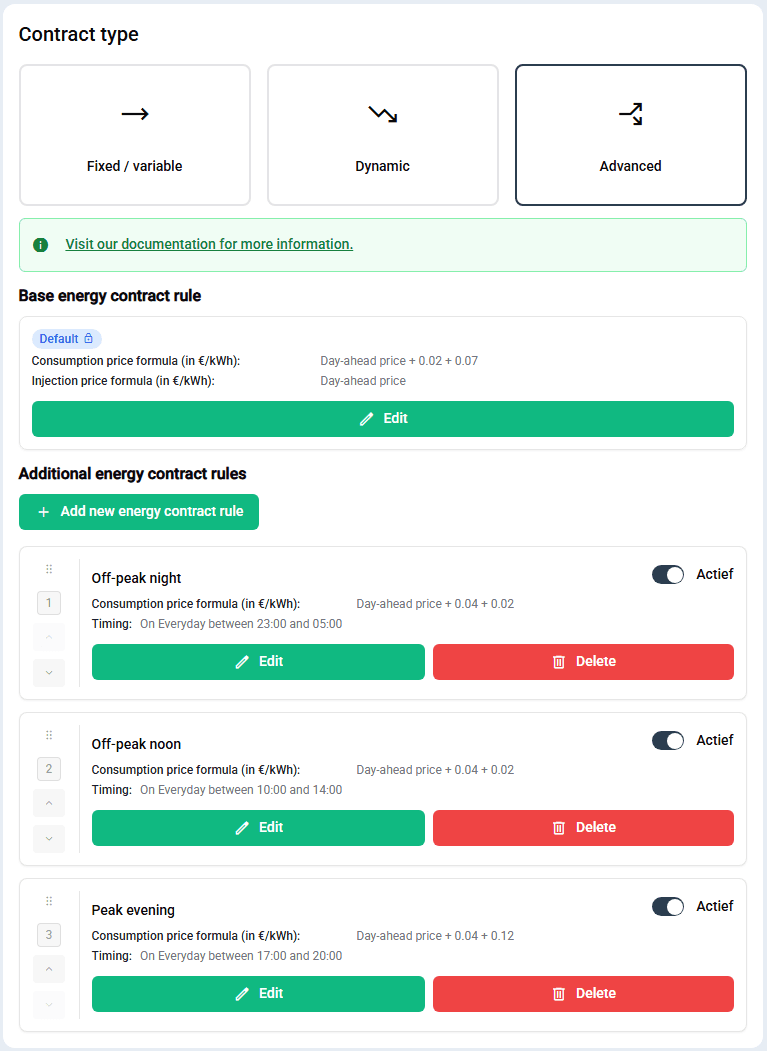
Figure: In Germany, net tariffs are time dependent. Often, there is a default rate (Standardtarif), a more expensive peak rate (Hochtarif) and a cheaper rate (Niedertarif). The images shows how two ways configure prices for an energy provider offering a dynamic tariff where the energy price equals the epex spot plus 4 cents/kWh, with net tariffs as follows:
- off-peak tariff of 2 cents/kWh from 23:00 to 05:00 and from 10:00 to 14:00
- peak tariff of 12 cents/kWh from 17:00 to 20:00
- a default tariff of 7 cents/kWh at any other time Whilst both approaches are correct and minimal in terms of the number of rules, the second configuration relies on a correct ordering of rules and therefore the first modelling approach is preferable.
Note
The rule set is usually easier to configure when the rule with the timing which is the hardest to describe is the default rule.