
Grid limits
Note
The grid system, current and power limits are requested during the initial setup. You can later change them from the menu "Settings" in the commissioning interface.
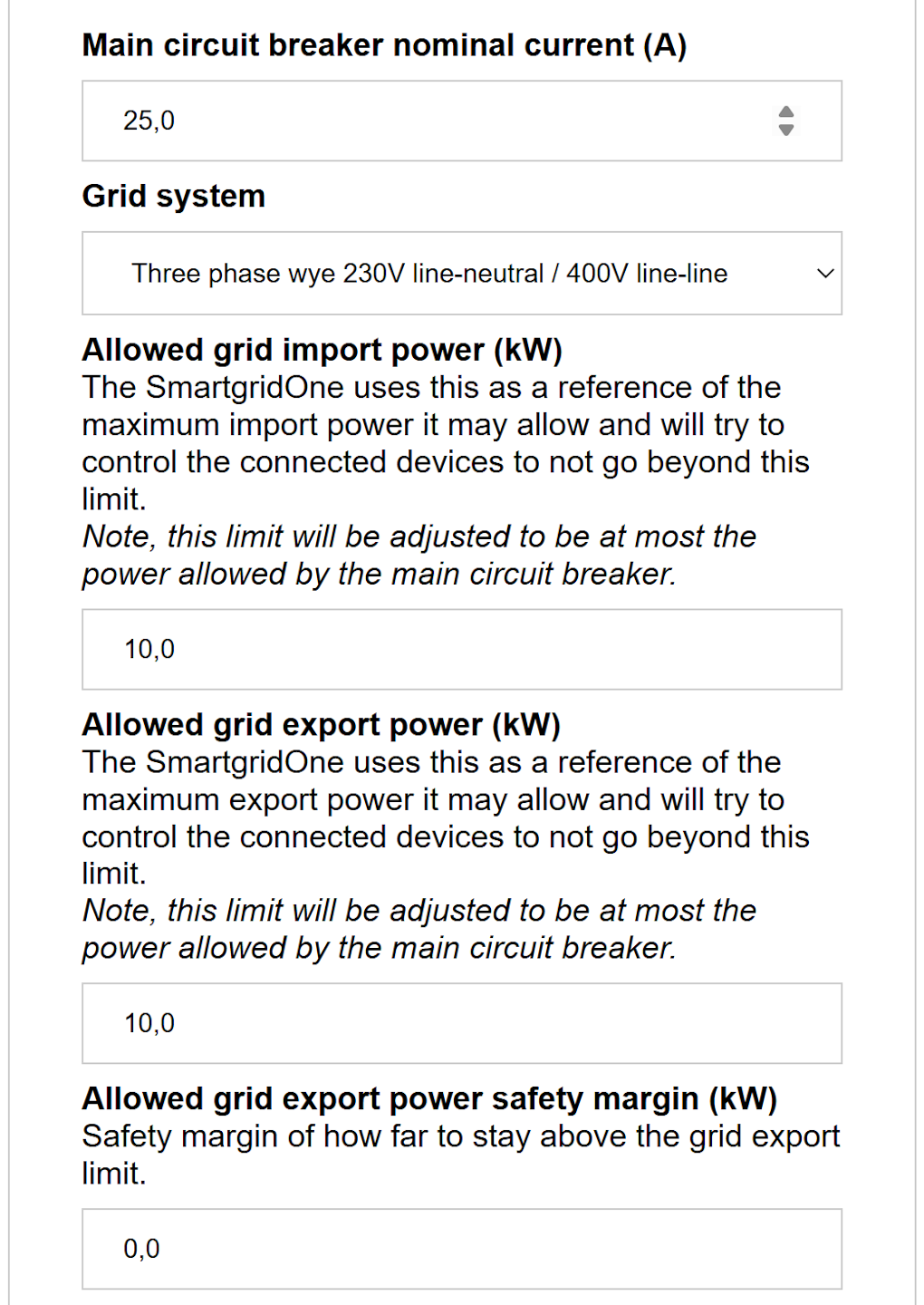
-
Enter the nominal current of the main circuit breaker of the electrical installation.
-
Choose the appropriate grid system under "Grid system." You have the choice of:
- Single-phase 230V
- Three-phase wye 230V line-neutral / 400V line-line
- Three-phase delta 230V line-line
- Other voltage or phase configuration: choose the grid type (single phase, three phase wye or three phase delta) and enter the phase-neutral or phase-phase voltage at the main circuit breaker yourself. Use this for installations at another voltage level, for example behind a transformer.
-
Under "Allowed grid import power", enter the maximum power that may be taken from the grid.
This corresponds to an import limit. -
Under "Allowed grid export power" enter the maximum power that may be fed back to the grid.
This corresponds to an export limit. -
You can optionally enter a safety margin, under "Allowed grid export power safety margin" if desired.
Note
Both power limits are adjusted to be at most the power allowed by the main circuit breaker. Above the field, the settings page shows the effective limit that results from the circuit breaker and the safety factor, so that you can see what the SmartgridOne Controller will actually apply.
Note
"Three-phase delta 230V line-line" occurs only in certain geographical areas.
Safety factor and safety margins
The SmartgridOne Controller never controls the installation right up to the configured limits. Two mechanisms keep a distance:
- The grid limit safety factor (0.9 by default) multiplies both limits: everything, including solar production, is controlled to stay within 90% of the configured limits. This leaves room to react to sudden power fluctuations, for example clouds flying over. It can be changed in the advanced settings.
- The allowed grid export power safety margin (kW) of this page is an absolute extra distance below the export limit, on top of the safety factor. Use it if you absolutely have to avoid feeding in. It is 0 kW by default.
The export safety margin that is finally subtracted from the export limit (after the safety factor) is the largest of two values: the absolute safety margin of this page, and the grid export safety margin fraction (1.5% by default, an advanced setting) of the larger of the two limits after the safety factor. This minimum margin prevents that the control comes too close to the export limit when no absolute margin is configured. It is not applied on a cloud SmartgridOne Controller.
Example
| Parameter | Value |
|---|---|
| Import power limit | 10.0 kW |
| Export power limit | 10.0 kW |
| Safety factor | 0.9, so the limits become 9.0 kW import and 9.0 kW export |
| Absolute safety margin | 0.0 kW |
| Margin fraction | 1.5% of 9.0 kW = 0.135 kW |
| Export safety margin | the largest of 0.0 kW and 0.135 kW = 0.135 kW |
| Applied export limit | 9.0 kW minus 0.135 kW = 8.865 kW |
With an absolute safety margin of 1.0 kW, the export safety margin would be 1.0 kW and the applied export limit 8.0 kW.
Quarter hour grid limits
By default, the grid limits are instantaneous limits: the grid power may never exceed them. For capacity tariffs that bill the quarter-hour peak, the limits can instead be interpreted as fifteen-minute averages. The SmartgridOne Controller then limits the average grid power of the current quarter hour to the configured limits. The instantaneous power can then be much higher than the limit, especially if the power was low during the first part of the quarter hour.
- On the settings page, scroll down and click "Go to advanced settings".
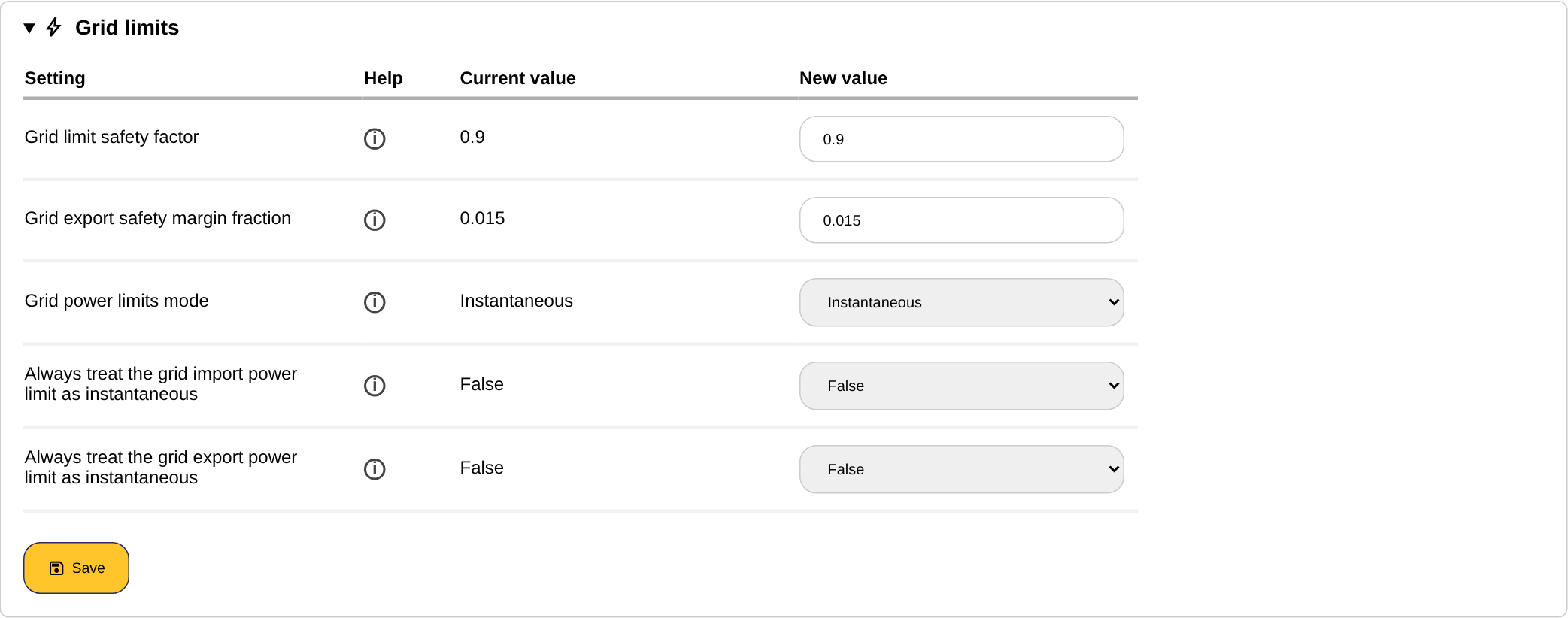
- Open the section "Grid limits" and set "Grid power limits mode" to "Fifteen-minute average".
- Optionally tick "Always treat the grid import power limit as instantaneous" or "Always treat the grid export power limit as instantaneous" to keep one of the two limits instantaneous while the other one is averaged, for example an export limit imposed by the grid operator next to an averaged import limit for the capacity tariff.
- Save the section.
Note
With averaged limits, the grid limit safety factor is at most 0.9, because the control comes closer to the real limits. External signals that cannot work with averaged limits switch the SmartgridOne Controller back to instantaneous limits as long as they are active.
See also Advanced settings.
Grid power limit schedule
Sometimes we need to deviate from the import or export powers on certain days or certain time of the days. This is can be enabled as followed:
- On the settings page, scroll down to navigate to the 'advanced settings'.

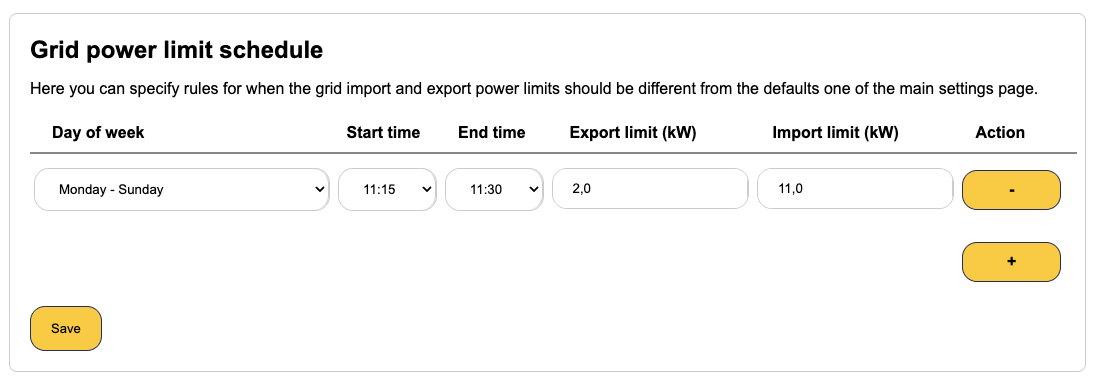
- Open the section 'Grid power limit schedule'. Here you can specify rules for when the grid import and export power limits should be different from the defaults of the main settings page. Every rule has a day of week, a month (all year round, a single month or a quarter such as 'Q1: January, February, March'), a start time, an end time and the export and import limit in kW that apply during the rule. Rules may not overlap.
- Save the settings.